How to play
AntiChess
AntiChess is a chess variant where the objective of the game is to be the first player to lose all of your pieces
There are a set of rules that make this concept work:
-
When any piece belonging to the player has the ability to capture an opponent piece, they must do so.
-
Players can freely move only if and when none of their pieces on the board can capture an opponent's piece.
-
The King has no royal power, and thus can be captured just like any piece. The game also does not end when the King is captured.
-
When a rook reaches the opposite end of the board, they will be promoted to a King piece.
Playing the game
-
When the program is started, the game will begin immediately, prompting White to move.

-
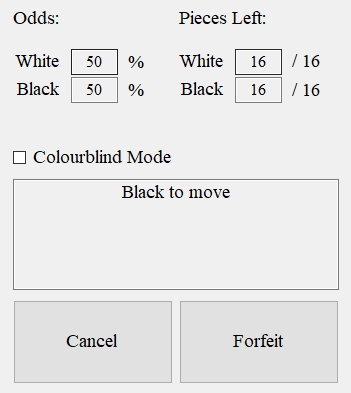
These are the indicators and additional controls to the game.
-
The 'Odds' section shows which side is closer to winning. The higher the percentage, the less pieces the player has remaining.
-
The 'Pieces Left' section shows how many pieces are left for each player.
-
The 'Colourblind Mode' checkbox allows you to turn the colours of the board into a colourblind friendly scheme.
-
The box will show the current state of the game. Players will know who's turn it is, and whether or not they are free to move.
-
The 'Cancel' button allows a selection to be cancelled. Selections can also be cancelled by clicking on a tile that is not highlighted.
-
The 'Forfeit' button allows a player to forfeit the game, which end the game with them losing as a result.
-
-
Selecting a piece will then highlight the tile, and the tiles which the piece can move to
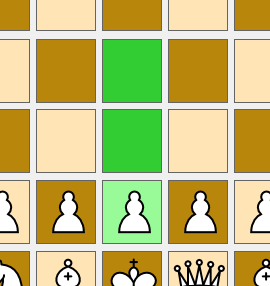
The player can can click on one of the highlighted tiles to move the piece to. If the player does not wish to move that piece, the player can click on any other tile or the 'Cancel' button.
-
When a player has pieces that can capture, those pieces will be highlighted

-
The player can then choose one of the highlighted tiles to capture an opponent piece with.
-
Upon selecting, the piece will highlight the opponent pieces that can be captured.

-
The player can then choose which piece to capture, or to cancel their selection
-
When a capture is made, the player's turn will end.
-
-
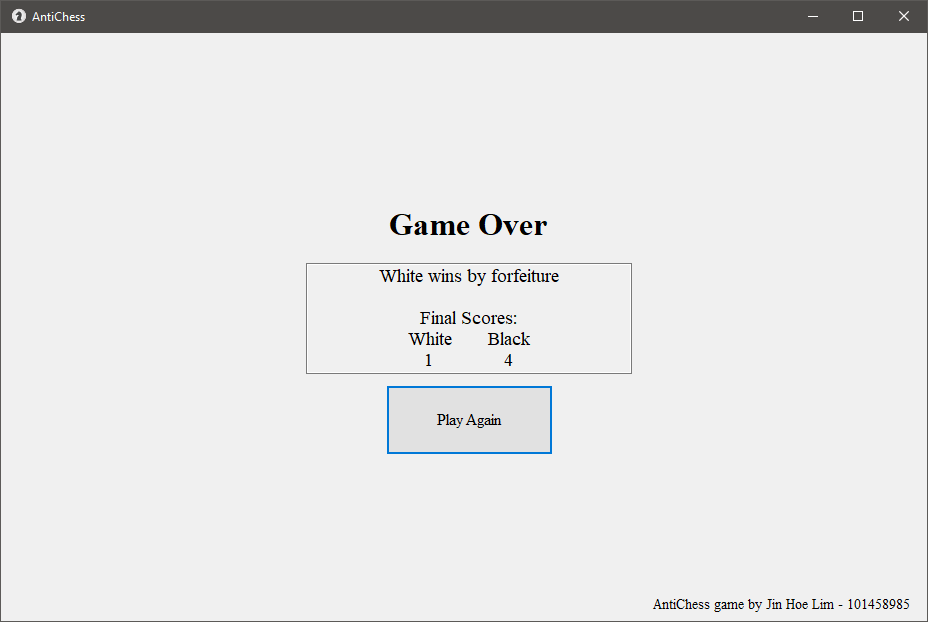
If a player chooses to forfeit the game, the game will end and the 'Game Over' screen will be displayed
-
Here, the box will display the winning conditions, and the final score of each player
-
The final score is determined by how many pieces the players managed to lose in the game
-
Here, the game can be restarted by clicking the 'Play Again' button.
-
Contact
Jin Hoe Lim Email: 101458985@student.swin.edu.au